close
  • English
  • Customize search functions

    You may need to customize search behavior for scenarios such as:

    • Processing search keywords, such as removing sensitive words.
    • Filtering the default full-text search results.
    • Reporting the search keywords.
    • Customizing the search data source, such as searching from the database.
    • Rendering custom search data sources.

    Rspress provides interfaces for extending the default theme's search components so you can customize search behavior.

    Understanding searchHooks

    Use the search.searchHooks option in the Rspress config to register search component hooks:

    import { defineConfig } from '@rspress/core';
    import path from 'path';
    
    export default defineConfig({
      search: {
        searchHooks: path.join(__dirname, './search.tsx'),
      },
    });

    The value of search.searchHooks is a file path. This file exports hook logic such as onSearch, allowing you to customize search at runtime. We call this file a searchHooks module.

    Hook functions in searchHooks

    The searchHooks module supports beforeSearch, onSearch, afterRender, and render.

    Tip

    In the searchHooks module, export only the hook functions you need.

    beforeSearch

    The beforeSearch hook runs before search starts. Use it to process or report search keywords.

    This hook supports asynchronous operations.

    Example:

    import type { BeforeSearch } from '@rspress/core/theme';
    
    const beforeSearch: BeforeSearch = (query: string) => {
      // Do something before search
      console.log('beforeSearch');
      // Return the processed query
      return query.replace(' ', '');
    };
    
    export { beforeSearch };

    onSearch

    The onSearch hook runs after the default full-text search finishes. Use it to filter or report search results, or to add a custom search data source.

    This hook supports asynchronous operations.

    Example:

    import type { OnSearch } from '@rspress/core/theme';
    import { RenderType } from '@rspress/core/theme';
    
    const onSearch: OnSearch = async (query, defaultSearchResult) => {
      // Request data based on query
      console.log(query);
      // The results of the default search source, which is an array
      console.log(defaultSearchResult);
      // const customResult = await searchQuery(query);
    
      // Operate on the default search results directly.
      defaultSearchResult.pop();
    
      // The return value is an array. Each item is a search source result that is added to the final search result.
      return [
        {
          group: 'Custom',
          result: {
            list: [
              {
                title: 'Search Result 1',
                path: '/search1',
              },
              {
                title: 'Search Result 2',
                path: '/search2',
              },
            ],
          },
          renderType: RenderType.Custom,
        },
      ];
    };
    
    export { onSearch };

    The onSearch hook returns an array of search source results. Each item has the following structure:

    {
      group: string; // The search result group name displayed in the UI.
      result: unknown;
      renderType: RenderType; // The type of the search result, which can be `RenderType.Default` or `RenderType.Custom`. `RenderType.custom` by default.
    }

    result is the search result and can have any structure you need. renderType controls how the result is rendered. When it is RenderType.Default, Rspress uses the default rendering logic. When it is RenderType.Custom, Rspress uses the render function.

    afterSearch

    The afterSearch hook runs after search results are rendered. Use it to access the final search keywords and results.

    This hook supports asynchronous operations.

    Example:

    import type { AfterSearch } from '@rspress/core/theme';
    
    const afterSearch: AfterSearch = async (query, searchResult) => {
      // Search keyword
      console.log(query);
      // Search result
      console.log(searchResult);
    };
    
    export { afterSearch };

    render

    The render function will render the custom search source data in your onSearch hook. Therefore, it generally needs to be used together with onSearch. Here's how to use it:

    import type { RenderSearchFunction } from '@rspress/core/theme';
    
    // The above OnSearch hook implementation is skipped
    
    interface ResultData {
      list: {
        title: string;
        path: string;
      }[];
    }
    
    // The render function for each search source
    const render: RenderSearchFunction<ResultData> = item => {
      return (
        <div>
          {item.list.map(i => (
            <div>
              <a href={i.path}>{i.title}</a>
            </div>
          ))}
        </div>
      );
    };
    
    export { onSearch, render };

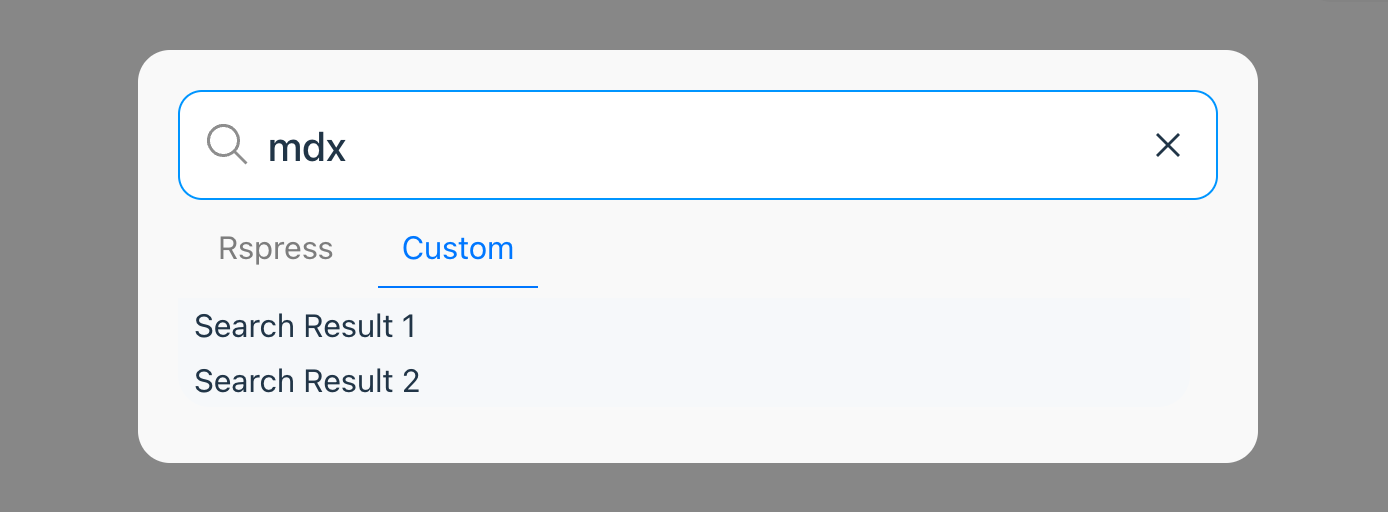
    The result is as follows:

    Custom Search Source Rendering