
llms.txt (SSG-MD)
Want to get started quickly? Jump to Quick Start.
What is SSG-MD?
Rspress provides the Static Site Generation to Markdown (SSG-MD) feature. Similar to Static Site Generation (SSG), SSG-MD renders pages as Markdown files instead of HTML files and generates llms.txt and llms-full.txt, making technical documentation easier for large language models to understand and use.
The following table compares SSG and SSG-MD:
What is llms.txt?
llms.txt is an emerging standard file format placed in a website's root directory to help large language models better understand and use website content.
Because LLMs have limited context windows, they usually cannot process an entire website's HTML content. Converting complex HTML with navigation, ads, and JavaScript to plain text is also difficult and imprecise. llms.txt solves this by providing a structured Markdown index that includes page URLs and content descriptions, helping AI tools quickly locate and understand key information.
In simple terms:
sitemap.xml→ "Site map" for search enginesllms.txt→ "Documentation index" for AI
Output structure example:
llms.txt content example:
Why SSG-MD?
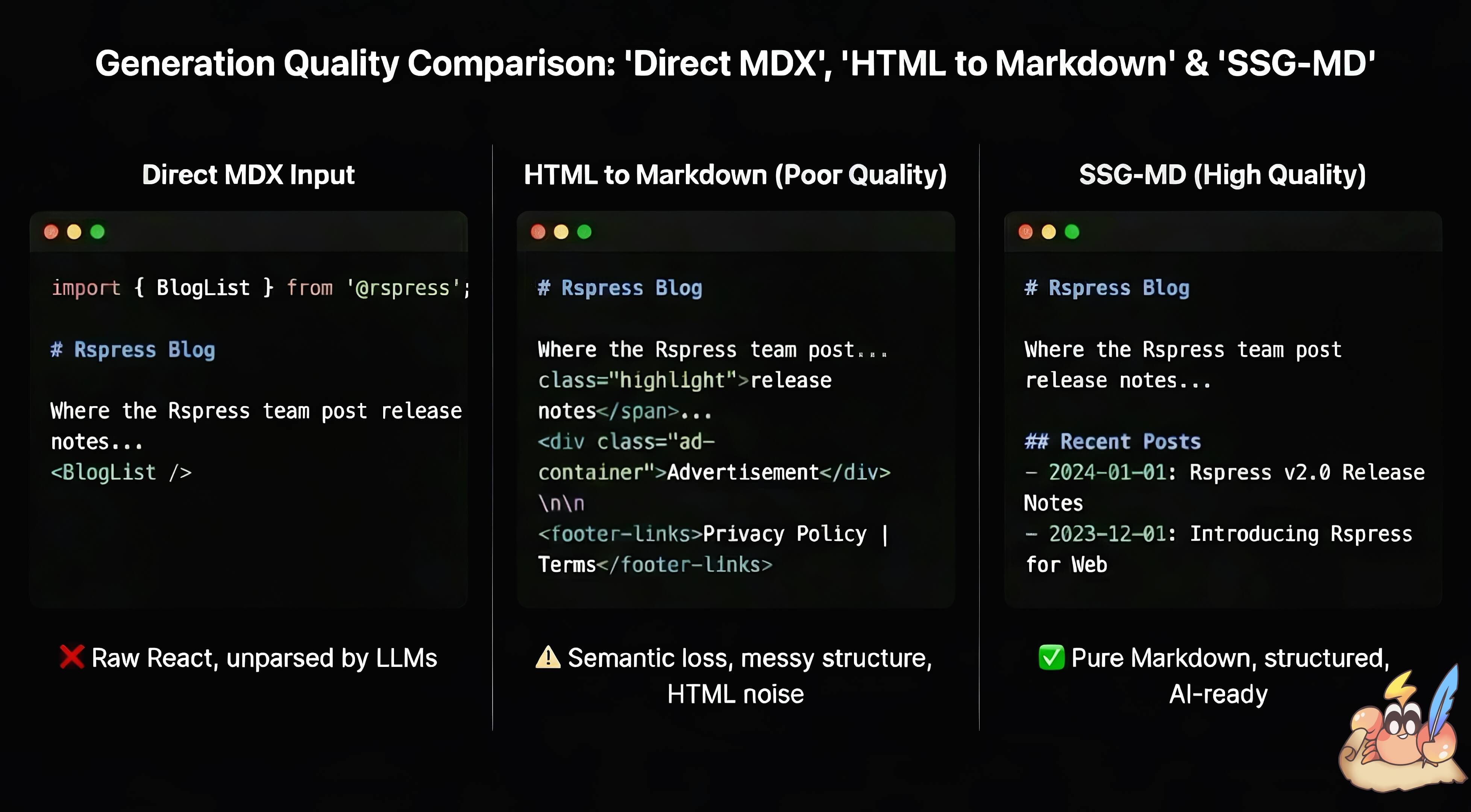
In React-based frontend frameworks, extracting static information from dynamically rendered content is often difficult. MDX has the same challenge: .mdx files contain Markdown content but can also embed React components, making docs more interactive. Rspress lets users enhance docs with MDX fragments, React components, Hooks, and TSX routes, but this dynamic content creates problems when converted to Markdown:
-
Feeding raw MDX to AI introduces code syntax noise and loses rendered React component content.
-
Converting HTML to Markdown often produces poor results, making information quality hard to guarantee.
Static Site Generation (SSG) generates static HTML for crawlers and improves SEO. SSG-MD addresses a similar problem for AI tools: it improves GEO and the quality of static information for large language models. Compared with HTML-to-Markdown conversion, rendering from React's virtual DOM gives SSG-MD a richer information source.
How does SSG-MD work?
- Rspress internally implements a
renderToMarkdownStringmethod similar torenderToStringinreact-dom, which renders React components to Markdown strings:
In principle, this API works for any site built with React; see react-render-to-markdown if you're interested.
- Rspress uses a custom remark plugin
remarkSplitMdxto preprocess MDX files before rendering. This plugin splits the MDX AST, separating pure Markdown content from JSX components: Markdown text is serialized as string literals, while JSX components and MDX expressions (e.g.,{variable}) are preserved as React elements. This ensures that Markdown content passes through as-is without being processed by React rendering, while dynamic components are rendered byrenderToMarkdownString.
For example, the following MDX:
It is transformed into a component like this:
- Rspress provides the
import.meta.env.SSG_MDenvironment variable so React components can distinguish SSG-MD rendering from browser rendering and customize their output:
- Rspress's internal component library is adapted for SSG-MD, so components render meaningful Markdown during the SSG-MD phase. For example:
It is rendered as:
Quick start
Starting in v2.1.0, llms is enabled by default (previously false).
After running rspress build, the output directory (default doc_build) will additionally contain the following files:
Access pages by replacing the .html suffix with .md, e.g., /guide/start/introduction.md. Multilingual sites will output {lang}/llms.txt and {lang}/llms-full.txt for non-default languages.
If your code is incompatible with SSR, set llms: false and use @rspress/plugin-llms.
SSG-MD uses react-render-to-markdown@19 by default, which only supports React 19. If you use React 18, install react-render-to-markdown@18 in your package.json:
After installation, Rspress automatically detects and uses the react-render-to-markdown@18 version from your project.
Configuration
UI display
When llms: true is enabled, LlmsCopyButton and LlmsViewOptions components are automatically displayed below all H1 headers, allowing users to copy Markdown content or open it in AI tools like ChatGPT or Claude. You can also display them in the outline panel instead by setting placement: 'outline'.
Customize or disable via themeConfig.llmsUI:
For more information, see themeConfig.llmsUI.
Customize llms.txt
Use llms.llmsTxt to compose the complete contents of each generated llms.txt file:
The callback can return a string or a Promise. It runs once for every generated language and version combination, and receives:
titleanddescription: The site metadata fromrspress.config.ts.langandversion: The language and version of the currentllms.txtfile.baseandsiteOrigin: The URL configuration used to generate Markdown links.sections: Pages grouped by navigation and ordered by the sidebar. Each page containstitle,description,frontmatter,routePath,link,lang, andversion. Thelinkfield is the final URL of the generated Markdown file.
Pages that do not match a navigation item are placed in an Others section. The locale home page is omitted because the site title and description represent it.
Custom MDX splitting
When documents contain custom components, use remarkSplitMdxOptions to control which components to keep or convert to plain text when converting to Markdown:
excludes: Matched components are converted to plain text and have the highest priority.includes: If set, only matched components are retained; all others are converted to plain text.- When both are configured,
excludesis applied first, then the result is filtered byincludes.