
Introduction
Rspress is a React-based static site generator built on Rsbuild. It ships with a default documentation theme so you can quickly build a documentation site, customize the theme for blogs or product homepages, and use official plugins for component library docs.
Why Rspress
Rspress is designed around the following core features:
- Build Performance. Fast startup keeps the authoring experience smooth.
- AI-native. Technical documentation not only serves human readers but can also be better understood and utilized by AI through SSG-MD.
- Theme and Customization. A brand-new default theme with multiple customization layers, including CSS variables, BEM class names, re-export overrides, and eject.
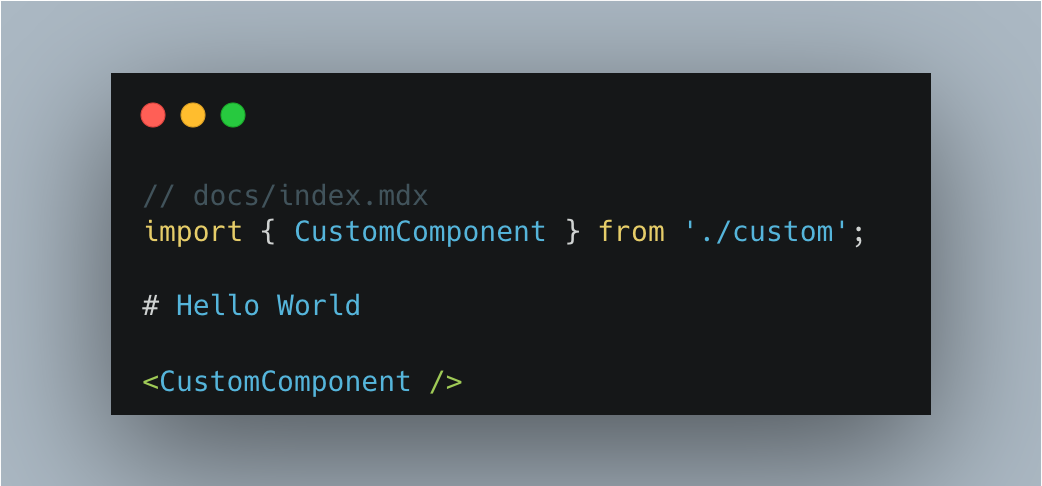
- MDX Support. MDX lets you reuse document fragments and render custom React components in docs.
- Documentation DX. Continuous improvements for authoring with navigation metadata, code blocks, and dead link checks.
- Documentation Site Essentials. Internationalization, multi-version docs, full-text search, component library docs, and more.
- Extensibility. A built-in plugin system for extending Rspress through plugin APIs.
These are also core requirements for static site development. The following sections cover them in detail.
Build performance
As projects grow, long startup times become a major drag on development. The longer a project lives, the more noticeable this cost becomes.
We started from a simple question: can an SSG framework break through the performance limits of the existing JavaScript toolchain and deliver near-instant startup for most projects?
Rspress was built to answer that question.
Rspress achieves strong performance through multiple optimization strategies:
lazyCompilation.lazyCompilationcompiles on-demand in dev mode. Pages are only compiled when you visit them, significantly improving development startup speed and even achieving millisecond-level cold starts.- Route Preload. When hovering over links, Rspress preloads target route resources ahead of time, pairing with
lazyCompilationfor a near-lossless dev experience. - Persistent Cache. For production builds, persistent cache is enabled by default, reusing previous compilation results during warm starts to improve build speed by 30%-60%.
- Rspack Bundler. Rspress uses Rspack, the Rust-based bundler from the same team. Rspack includes optimizations such as multi-threaded parallel compilation and incremental compilation, making it 5 to 10 times faster than traditional JavaScript bundlers in many scenarios.
Rspress also applies additional build optimizations internally. Combined with the Rust-powered front-end toolchain, these optimizations raise the performance ceiling for SSG frameworks.
AI-native
With the rise of large language models, technical documentation needs to serve not only human readers but also be better understood and utilized by AI.
Rspress provides SSG-MD capability, which renders pages as Markdown files instead of HTML files and generates index files compliant with the llms.txt specification.
Once enabled, the build output will include llms.txt (an index file showing page titles and descriptions in navigation and sidebar order), llms-full.txt (a complete file containing Markdown content from all pages), and .md files corresponding to each route.
For custom components, you can also use import.meta.env.SSG_MD to output AI-friendly plain text in SSG-MD mode, balancing interactive UX with higher-quality static information.
Just as SSG generates static HTML to improve SEO, SSG-MD improves GEO (Generative Engine Optimization) and provides higher-quality static information for large language models.
For detailed usage, see the SSG-MD documentation.
Beyond build performance and AI-native capabilities, Rspress also provides a default theme, automatic layout generation, MDX, Shiki code highlighting, internationalization, multi-version docs, full-text search, and a plugin system. The following sections cover these capabilities in more detail.
Default theme and customization
Rspress provides a well-designed default theme with a strong reading experience and a high degree of customizability.
Theme customization
The default theme exposes CSS variables for theme colors, code blocks, homepage components, and more. All built-in components follow the BEM naming convention, making styles easier to override with standard CSS selectors. If CSS is not enough, you can override built-in components through ESM re-exports in theme/index.tsx.
rspress eject Command
When CSS variables cannot meet your customization needs, you can use the rspress eject command to copy the source code of built-in components to your project's theme directory for complete customization.
Navbar and sidebar tags
Rspress provides a Tag component. You can define tag in frontmatter and display those annotations in headings, the navbar, the sidebar, and the outline.
Automatic layout generation
Most documentation sites need these layout modules in addition to the main content:
- Navbar for global navigation.
- Sidebar for the page tree under the current nav item.
- Outline for the heading structure of the current page.
For the document outline, Rspress automatically extracts headings from the current page and displays them on the right side by default.
For the navbar and sidebar, Rspress supports two configuration methods:
- Declarative config. Configure the corresponding data by declaring
_meta.jsonin the directory:
See Autogenerated navigation for details.
We recommend declarative config for most sites because it:
- Keeps the config file concise.
- Makes the relationship between the file tree and sidebar tree more intuitive.
- Lets you add or remove sidebar entries in the current directory instead of jumping back to
rspress.config.ts.
Programmatic config is useful when the navigation needs to be generated dynamically. For example, the official Rspress TypeDoc plugin converts TypeDoc JSON data into nav and sidebar config.
MDX support
MDX is a powerful content development format. You can not only write Markdown files as usual, but also use React components in the content of Markdown:
In addition, Rspress also supports some specific syntax, such as:
- Custom container syntax.
- Frontmatter metadata definition.
- Code line highlighting syntax.
See Use MDX for details.
Code highlighting with Shiki
Rspress uses Shiki by default for code highlighting. Compared to runtime highlighting solutions, Shiki performs highlighting at compile time, achieving accurate syntax highlighting consistent with VS Code based on TextMate grammar, without adding runtime overhead or bundle size.
You can customize code block color schemes through CSS variables, and interactively switch and preview different Shiki themes on the CSS Variables page. Shiki also allows extensions through custom transformers to enrich writing, such as twoslash.
Documentation DX
Rspress also brings a more complete authoring experience:
- Dead link checking is enabled by default and catches invalid links during builds.
- File code blocks support
file="./path/to/file"so examples can live in standalone source files. - The
previewplugin now uses meta-based configuration and works better with file code blocks. previewandplaygroundcan now be enabled together for component docs and interactive examples.
For concrete preview and playground examples, see the Component documentation section below.
SSG
Rspress is an SSG framework. During a production build, it generates static HTML for each page and writes the result to the output directory.
You can deploy the generated output to any static hosting service, such as GitHub Pages, Netlify, or Vercel.
Rspress also provides configuration for customizing the HTML generated by SSG. For details, see Static Site Generation.
Internationalization (I18n)
Internationalization is common for documentation sites. Rspress keeps i18n straightforward by modeling it around these tasks:
- Define the i18n data source.
- Configure the site for each language.
- Organize docs for different languages.
- Use i18n text in custom components.
Rspress includes built-in translations for Chinese, English, Japanese, Korean, and more languages, with more to come. The system tree-shakes language text based on your configuration and usage, bundling only what you need. You can also extend or override translations through i18nSource.
You can follow the I18n Tutorial to implement internationalization for your site step by step.
Multi-version
Some sites need to maintain docs for multiple product versions. Rspress has built-in multi-version support: enable it with a small config block, then organize versioned directories naturally without extra concepts.
Full text search
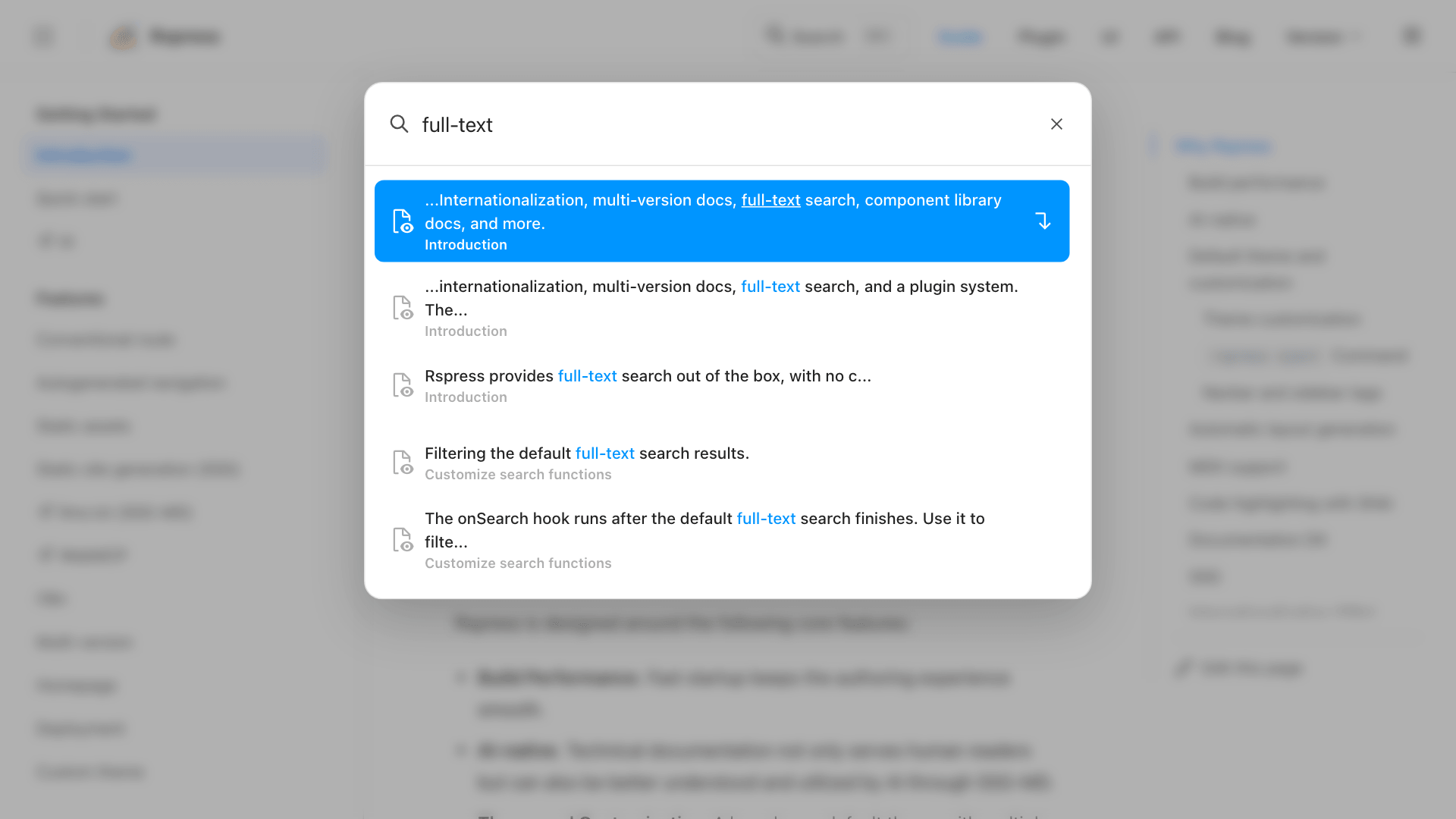
Rspress provides full-text search out of the box, with no configuration required. It is based on the open-source FlexSearch engine:
Custom theme
Rspress supports two ways to customize themes:
- Extend from the default theme. In each component of the default theme, many slots are provided for you to add custom layout content, for example:
- Fully customized theme. If you want to build a custom theme from scratch, customize the
Layoutcontent and use Rspress runtime APIs such asusePageDatato access compile-time data, routing information, and more.
For details about custom themes, see Custom Theme.
Plugin system
The plugin system is a core part of Rspress and lets you extend site build behavior. For details, see Plugin Introduction.
Component documentation
Rspress provides component preview and live editing through @rspress/plugin-preview and @rspress/plugin-playground, which works well for component library docs and interactive examples.
Component library demo preview
Use the ```tsx preview syntax in mdx files:
It renders as follows:
Current count: 0
If you prefer to keep demo code in external files, you can combine it with file code blocks. See @rspress/plugin-preview for details.
Component library real-time playground
Use the ```tsx playground syntax in mdx files:
It renders as follows:
For iframe preview mode, layout direction, and combining it with preview, see @rspress/plugin-playground.
Differences from other SSG frameworks
Differences from Docusaurus
Docusaurus is an open-source SSG framework by Meta. Like Rspress, it uses React as the rendering framework and supports MDX. However, the main differences between Rspress and Docusaurus are:
-
Rspress provides better build performance through lazyCompilation and persistent cache, achieving millisecond-level cold starts. For details, see Build Performance.
-
Rspress has simpler configuration and a lower learning curve. It avoids unnecessary concepts and reduces cognitive load where possible, with built-in search and intuitive multi-version docs.
-
Rspress provides a higher-level abstraction over the bundler. Low-level bundlers such as webpack and Rspack expose complex configuration. Docusaurus exposes the underlying bundler config directly, while Rspress offers simpler, user-friendly options. For example, you can add tags to
<head>throughbuilderConfig.html.tagswithout registering a bundler plugin such ashtml-webpack-plugin.
Differences from Nextra
Nextra is an open-source SSG framework by Vercel. Like Rspress, it also uses React as the rendering framework and supports MDX. The main differences between Rspress and Nextra are:
- Rspress has better build performance. See "Differences from Docusaurus" for details.
- Rspress is lighter overall. Nextra depends on Next.js, and its SSG pipeline is based on Next.js. Its output is therefore not pure HTML; it also includes Next.js runtime code. This increases output size and usually requires deployment as an application with
next startrather than as a pure static site. Rspress is not tied to an application framework, so its output is lighter and can be deployed as a pure static site.
Differences from VitePress
VitePress is a static site generator based on Vite. It is characterized by using Vue as the rendering framework and has excellent performance. The main differences between Rspress and VitePress are:
- Rspress uses React as the rendering framework, while VitePress uses Vue.
- Rspress uses MDX for content development, while VitePress uses Markdown and supports Vue components in Markdown, which also leads to differences in the implementation of the underlying compilation toolchain.
- For build performance, both Rspress and VitePress can start quickly in development. In production, VitePress bundles with Rollup and faces similar performance limits to other JavaScript-based toolchains. Rspress is faster in this phase.
Try Rspress
Go to Quick start to learn how to use Rspress to quickly build a documentation site.